
Free WordPress security plugin
Always on, for every part of your site.
Guard Dog keeps bots off your login, gives your people safer ways in, keeps sessions in check and writes down what happened. It also adds the everyday tools WordPress never shipped. Free, with every feature included.
Free on WordPress.org · Open source (GPLv2) · Doesn't phone home
- CAPTCHA choices
- 4
- Username leaks closed
- 7
- Ways to sign in with an account you have
- 6
- Email providers
- 5
- Blocks for your own pages
- 7
- Kinds of event logged
- 121
Needs WordPress 6.0+ and PHP 8.1+ · tested up to WordPress 7.1
Requirements and compatibility[ Log ] One sample day
A day on your site, line by line.
Eight things that happen on a busy site, and the part of Guard Dog that handles each one. Tap a line to see the setting behind it.
Showing 8 of 8 lines
- See the setting for this line
- See the setting for this line
- See the setting for this line
- See the setting for this line
- See the setting for this line
- See the setting for this line
- See the setting for this line
- See the setting for this line
Guard Dog acted Someone was let in
A sample day. Times are illustrative, and addresses come from the ranges set aside for documentation. 5 tries and 15 minutes are the defaults; you can change them.
What happened
Turned away · 404A bot went looking for the standard WordPress login page and got a not found page instead of a password box. You pick the new address. Password reset and logout keep working, and login links across WordPress update themselves.
The layer
[01]Custom login URL
The setting
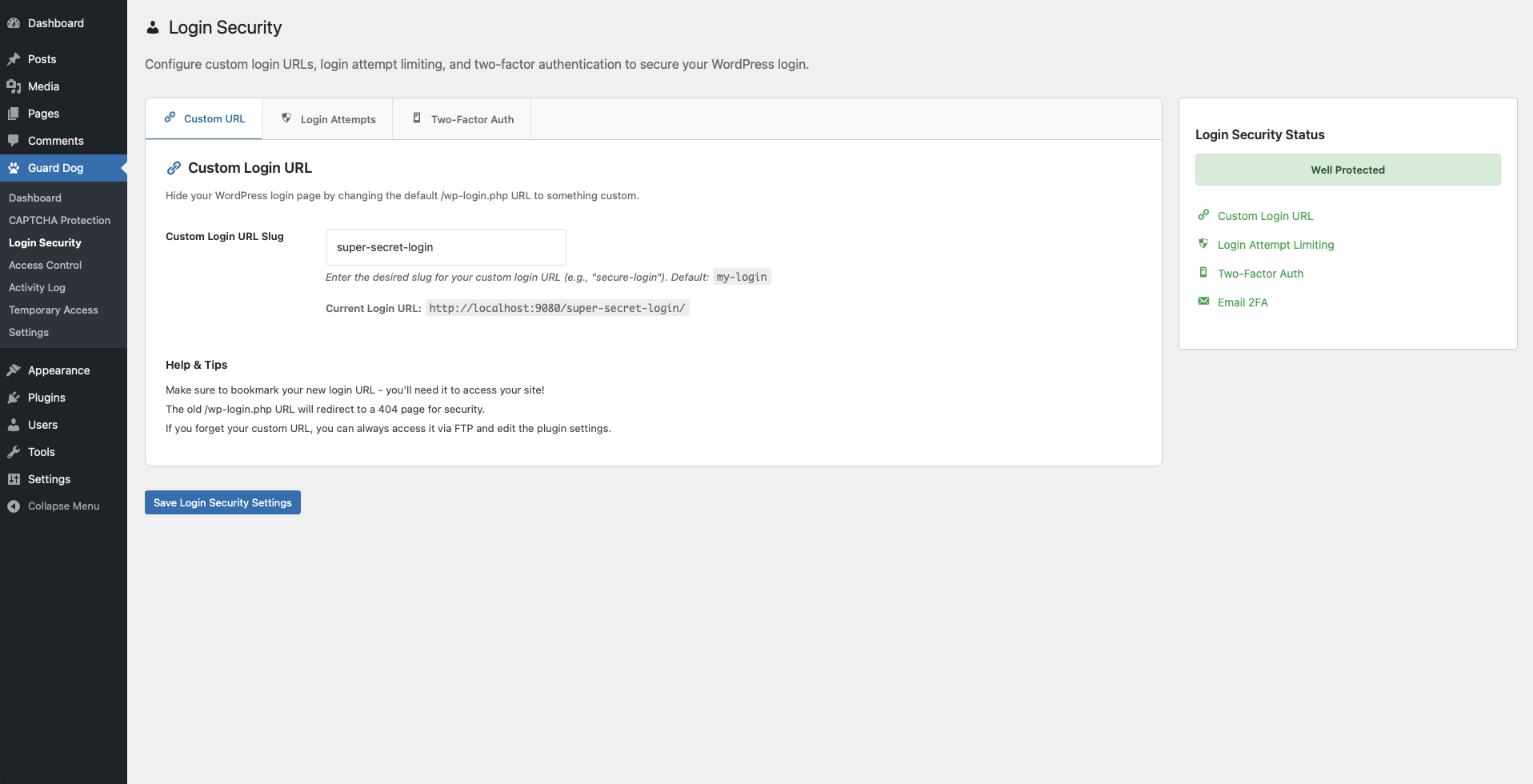
- The new address you choose.
What happened
Turned away · CAPTCHAA script filled in your login form. The CAPTCHA you chose checked for a person and didn't find one.
The layer
[02]CAPTCHA
The setting
Your pick of four providers
- reCAPTCHA v2
- reCAPTCHA v3
- hCaptcha
- Cloudflare Turnstile
What happened
Waiting · 15 minSomeone kept guessing passwords for admin. After a few wrong tries from one address, that address has to wait. Lockouts end on their own, and because they go by address rather than account, a stranger can't lock a real user out.
The layer
[03]Attempt limits
The setting
Wrong passwords from 198.51.100.7
What happened
Turned away · nothing hereSomeone asked for author number one to learn a username and got an ordinary nothing here. Guard Dog closes the six other places WordPress gives usernames away, too.
The layer
[04]Username leaks
The setting
All seven, closed
- REST API user list
- Author archives
- Login error messages
- Password-reset messages
- XML-RPC user methods
- oEmbed author data
- Registration errors
What happened
Let in · passkeyYou signed in with Face ID. Passkeys also work with Touch ID, Windows Hello, an Android fingerprint or screen lock, or a security key, and only on your real site, so a look-alike page can't trick anyone out of one. Prefer codes? Two-factor by app or email, with ten recovery codes in case of a lost phone.
The layer
[05]Two-factor and passkeys
The setting
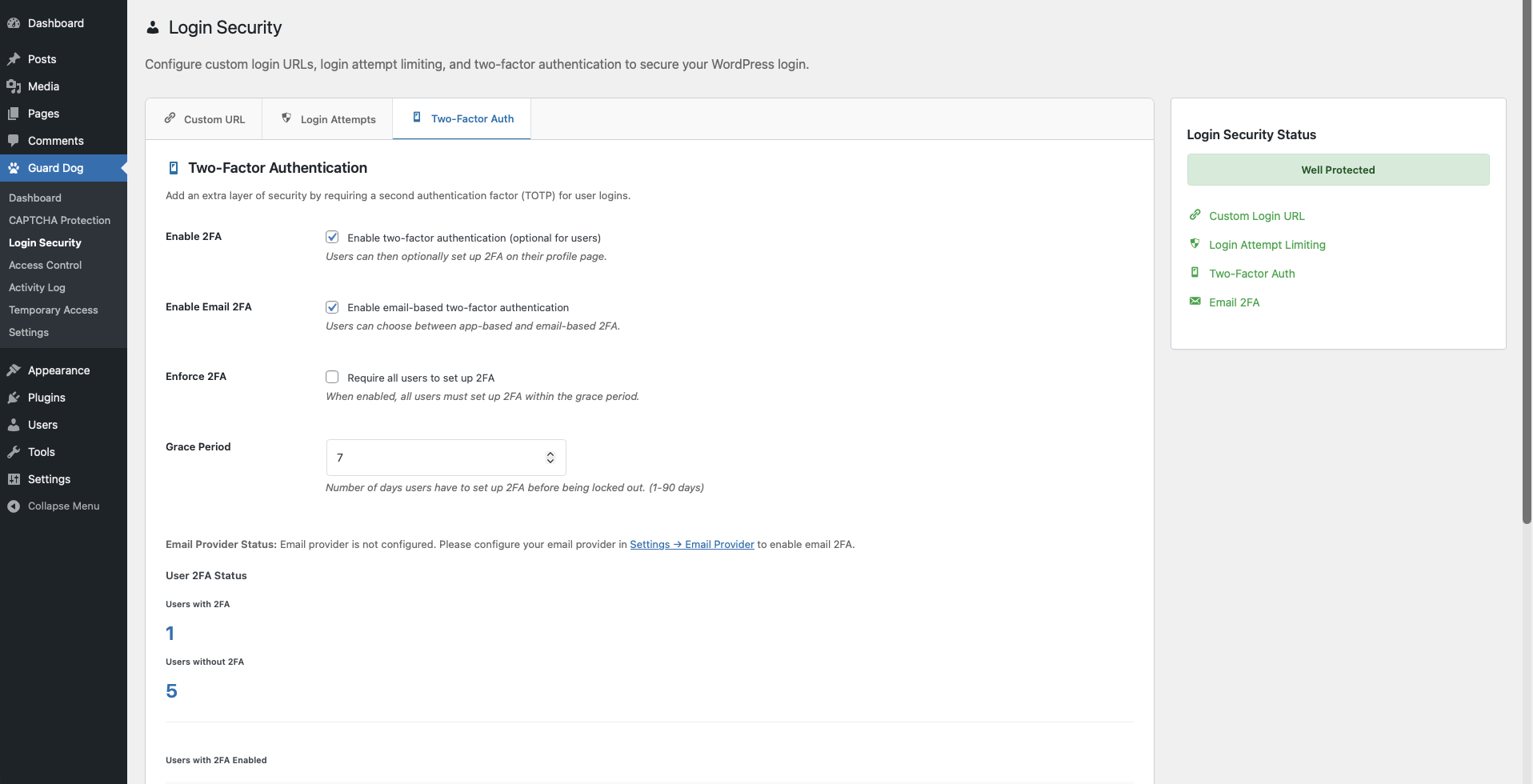
- Two-factor switched on, optional for each person.
- Codes by email too, so people can pick app or email.
- Make it required, with a grace period to set it up.
What happened
FlaggedYour account turned up signed in from another country while you were signed in at home. Guard Dog flagged both sessions and can email the account owner, and you can sign out the device you don't recognize.
The layer
[06]Sessions
The setting
Signed in to your account
- This browser Signed in now · Flagged
- Unknown device Flagged · another country Signed out just now
What happened
Turned away · your 'back soon' pageSomeone found your staging site. Site-wide lockdown lets only approved addresses in and shows everyone else your own back-soon page.
The layer
[07]Access rules
The setting
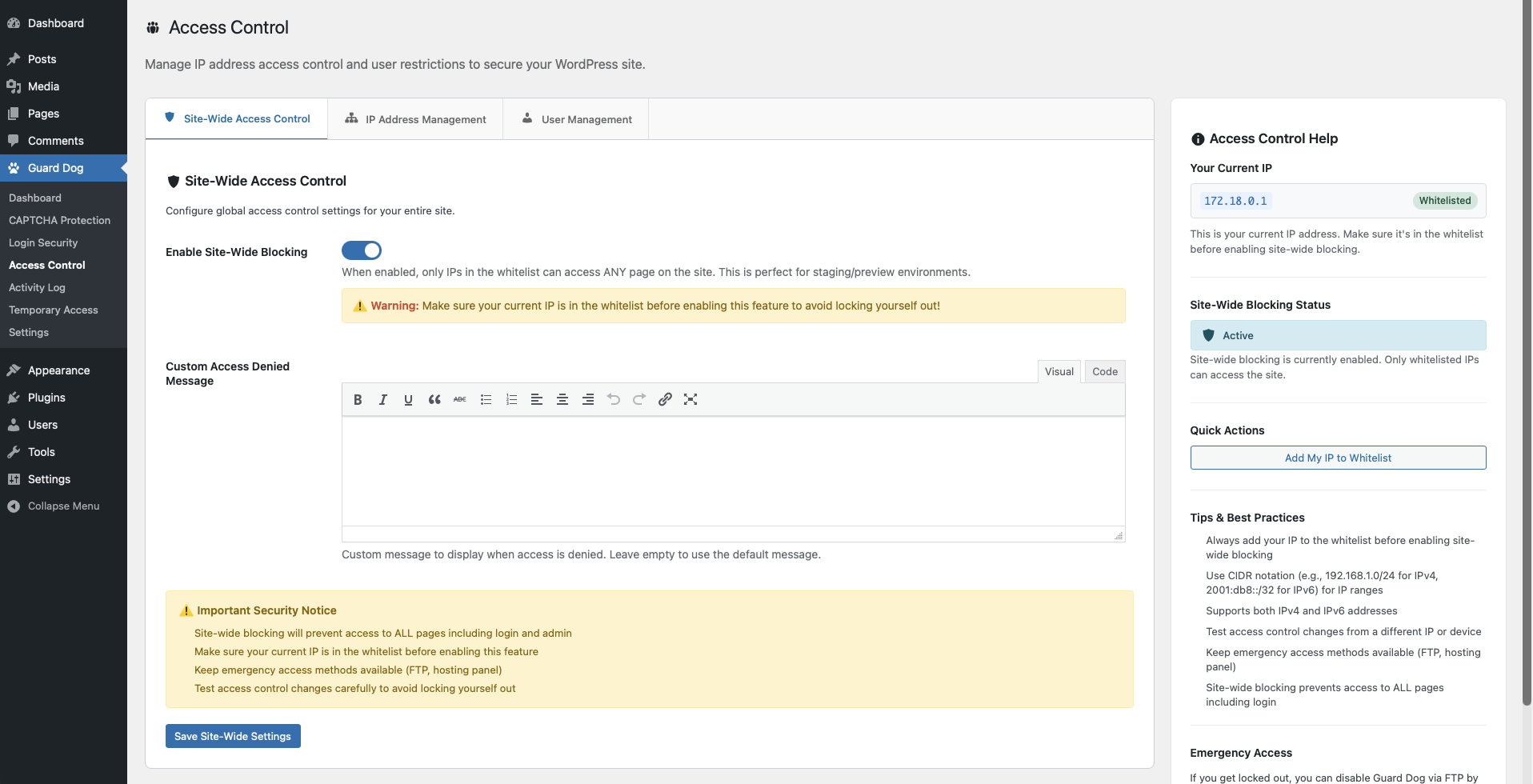
- Site-wide blocking is on. Only the allow list gets in.
- Puts your own address on the allow list in one click.
What happened
LoggedYou opened the activity log. Every sign-in, lockout and alert from the day is there, with the address it came from.
The layer
[08]Activity log
The setting
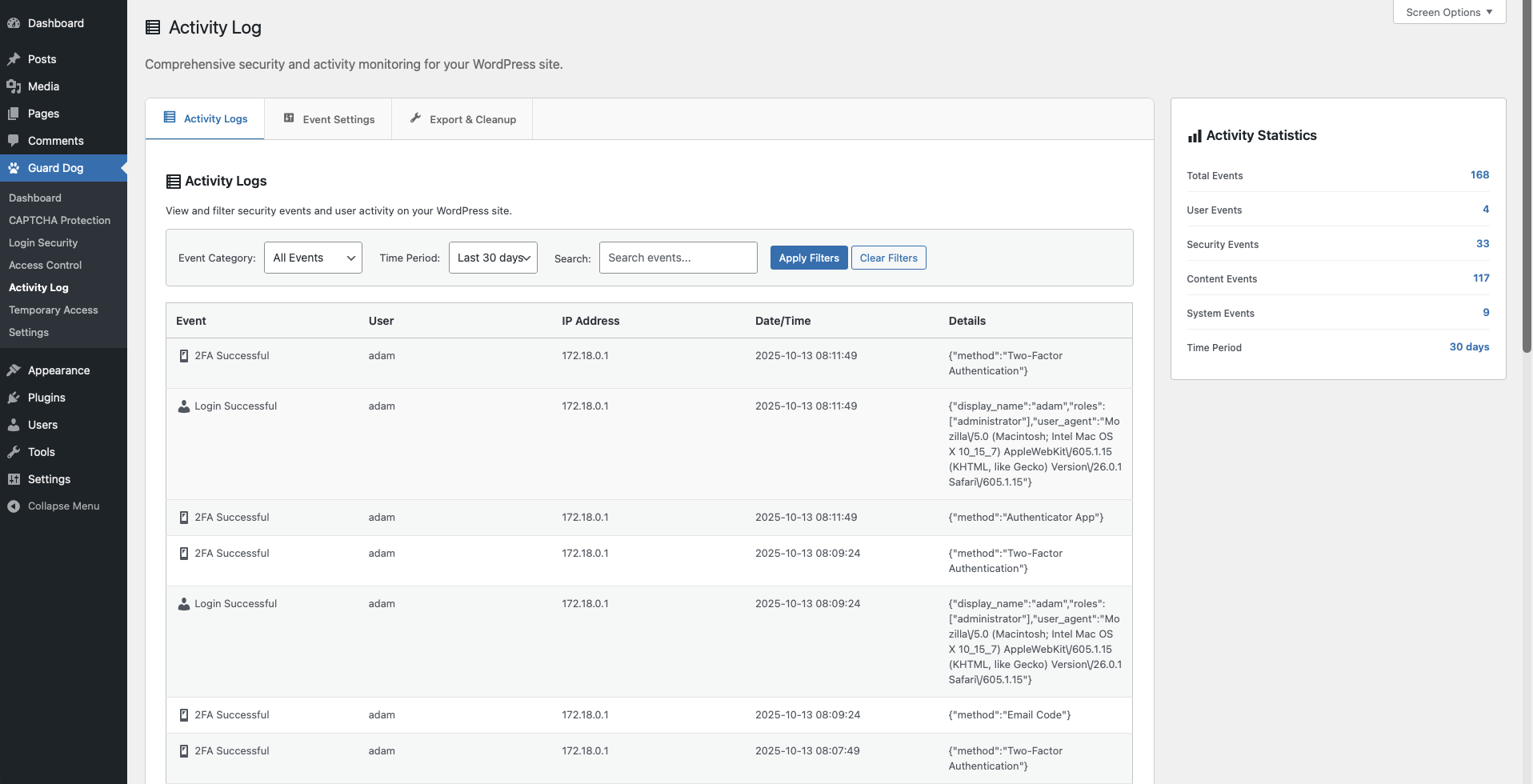
- A two-factor check that passed.
- A sign-in that got through.
That's one day. Every layer is optional, and all of them are in the free plugin.
See every layerWordPress leaves a few gaps.
Guard Dog fills them.
These are defaults, not bugs. Each one has a setting in Guard Dog.
| WordPress, out of the box | With Guard Dog |
|---|---|
| The login page sits at /wp-login.php, the first place bots look. | It moves to an address you pick. Bots get a not found page. [01] |
| Usernames show up in seven places, from the REST API to login errors. | All seven closed. Snoopers get an ordinary nothing here. [04] |
| Anyone can tick “Confirm use of weak password”. | Your rules: length, common passwords blocked, no reuse, live feedback as they type. [Accounts] |
| A sign-up creates an account straight away, whether or not the inbox is real. | New accounts click a link in their inbox before they can log in. [Accounts] |
| There's a Log Out Everywhere Else button, but no list of which devices are signed in. | Every session listed, with remote sign-out and alerts. [06] |
[ Extras ] Beyond security
The everyday stuff WordPress never shipped.
Security comes first, but Guard Dog also fills the gaps that make running a site with other people in it a chore. Same free plugin, no add-ons.
-
[+01]
Temporary user access
Real WordPress users for contractors and clients that expire on schedule and sign in by secure link.
-
[+02]
Frontend login form
A shortcode or block that puts a full login form on any page, with CAPTCHA, passkeys and social buttons.
-
[+03]
Account security blocks
Members manage their own two-factor, passkeys and sessions from your site instead of wp-admin.
-
[+04]
Login screen customization
Your logo and colors, and optionally your theme’s header and footer, on every login, reset and two-factor screen.
-
[+05]
Email templates and providers
Brand Guard Dog’s security emails and send them through Amazon SES, Mailgun, Resend, SendGrid or Google.
-
[+06]
Magic Login
Optional single-use email sign-in links for existing accounts. Handy as a passkey recovery path.
Getting started
Up and running in four steps.
Start with the basics. Add more whenever your site needs it.
-
Install and activate
From the WordPress plugin directory, like any other plugin.
-
Pick a new login address
Bots looking for wp-login.php stop finding it.
- Bookmark the new address before you log out.
- Test it in a private window first.
-
Add a CAPTCHA
Pick reCAPTCHA, hCaptcha or Turnstile and paste in your keys, then switch on login attempt limiting.
-
Add a second check
Turn on two-factor and passkeys. Tune access rules and sessions whenever you like.
Locked yourself out? Lockouts expire on their own, and renaming the plugin folder gets you back in.
Lockout quick fixesFive house rules.
Serious about security. Not serious about itself.
-
Everything's included.
Every feature on this site is in the free plugin on WordPress.org, licensed GPLv2.
-
It doesn't phone home.
No analytics, no usage tracking, nothing sent to us. Some features check with an outside service, like your CAPTCHA provider or an IP lookup service; the privacy guide has the details.
-
Secrets stay secret.
Two-factor secrets are encrypted, recovery codes are hashed, passwords never reach the logs, and passkey private keys never leave the person's device.
-
You choose the layers.
Every feature is optional. Start with what you need and add more as your site grows.
-
Help on hand.
A guide for every feature, a troubleshooting guide, and public release notes and roadmap.
Recently added
- GitHub, LinkedIn and Facebook sign-in
- Magic Login email links
- Passkey cleanup in password managers
- Your theme's header and footer on the login screen
- Broader IP matching for access rules
- A fully translatable activity log
Stay in the loop
Ears up.
Something big is coming.
Guard Dog is still the free WordPress security plugin you know. We're working on what comes next, and we're keeping the kennel door closed until it's ready.
Get the good stuff in your inbox.
Plugin releases, important security notes, and the occasional early look. Low volume. No nonsense.
By signing up, you agree to receive Guard Dog plugin updates and early news. Unsubscribe anytime. Privacy details
Questions people ask first.
Short answers here, full ones in the docs.
Is Guard Dog really free?
Yes. Guard Dog is a complete, free plugin on WordPress.org. Every feature on this site is included.
Download Guard DogWhat if I lock myself out?
Login lockouts expire on their own. For anything else, renaming the plugin folder over FTP disables Guard Dog so you can log in and fix the setting.
Lockout quick fixesWill it slow my site down?
Its login, CAPTCHA and passkey scripts load only on login screens and on pages where you place a Guard Dog block, so everyday visitors don't download them.
Performance guideDoes it work behind Cloudflare or a managed host?
Yes. Pick the IP detection method that matches your proxy or CDN, then add its addresses to Trusted Proxy IPs, so lockouts and logs see real visitor addresses.
Proxy setupCan I use it with another security plugin?
Usually. Keep your malware scanner or firewall; Guard Dog covers the login, accounts and sessions. Don't stack a second custom login URL or two-factor plugin on top, and test the combination on staging first.
Full FAQDoes it work with WooCommerce or membership plugins?
When they use WordPress's own login, yes: store, forum and member logins get the same protection. Test membership setups on staging first.
Full FAQDoes Guard Dog collect data about my site?
No. It doesn't phone home, send analytics, or share your site data with us. Some features check with an outside service, like your CAPTCHA provider or an IP lookup service; the privacy guide has the details.
Plugin privacy guideDoes it work on multisite?
Yes, custom login URLs included.
Full FAQ
Every WordPress site deserves a guard dog.
Free from WordPress.org. Every feature on this site is in the plugin you install today.